The 2026 Guide to Pre-Release Spotify Metadata Optimization
Optimized metadata increases first-release Spotify streams by up to 41%.
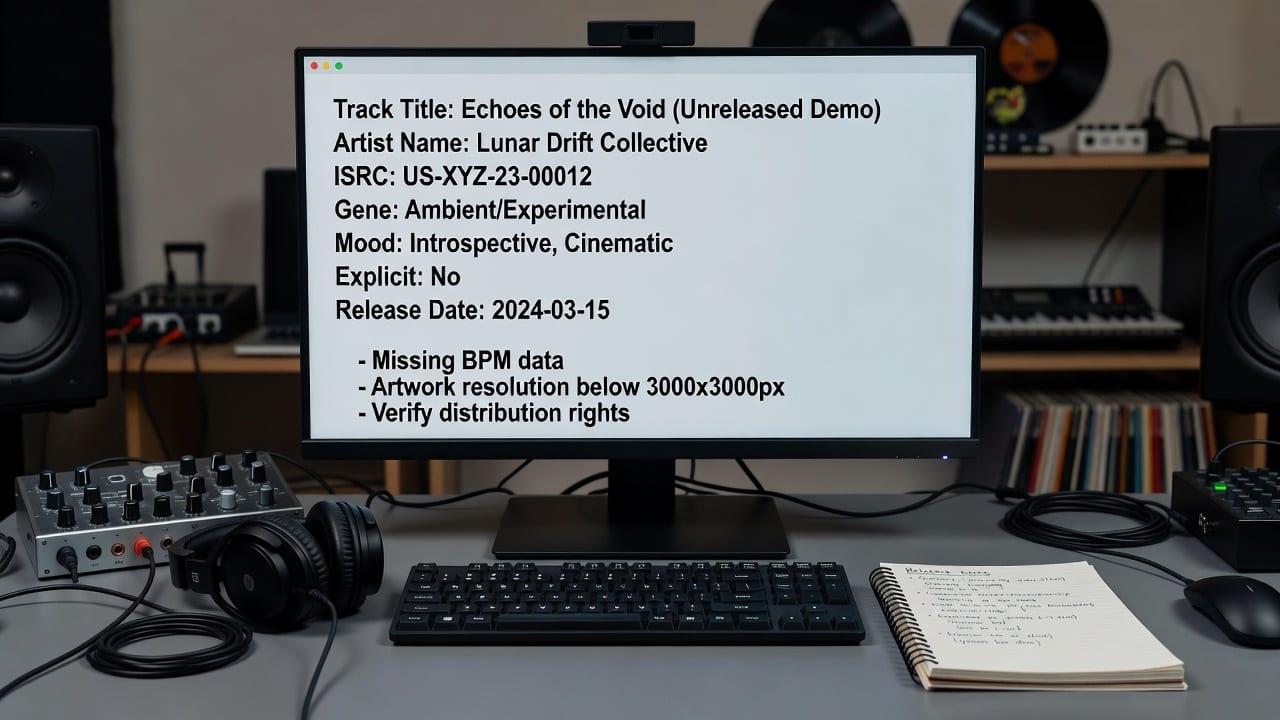
Artists use metadata analyzers to fix tags pre-release, ensuring Spotify's algorithm categorizes tracks perfectly.
Prerequisites: When and Who Should Optimize Metadata
If you are uploading a track to your distributor today for a release tomorrow, you are already too late.
Before applying this checklist, you must have a claimed Spotify for Artists profile, your final uncompressed WAV audio files, and an active account with a digital service provider (DSP) like DistroKid, TuneCore, or Ditto. You also need a foundational understanding of how to build a data-driven music release strategy, as metadata is the bedrock that supports all subsequent marketing efforts.
Do not attempt to optimize metadata after distribution. Once a track is ingested by Spotify's backend, updating core fields like primary artist formatting or ISRC codes often requires a complete takedown and re-upload, resetting your stream counts and algorithmic momentum to zero.
Core Concepts: Why Spotify's Algorithm Relies on Text
Spotify's recommendation engine does not have human ears. While it uses audio analysis to detect sonic profiles, it relies heavily on the text-based metadata you provide during distribution to contextualize that audio. This data dictates where your track lands in Release Radar, Discover Weekly, and algorithmic radio.
| Field | Purpose |
|---|---|
| ISRC | Tracks the specific sound recording for royalty collection |
| UPC | Tracks the release as a whole product |
| Primary artist, featured artists, songwriters, producers | Proper crediting and algorithmic matching |
| Explicit/clean tags | Content classification for playlists and recommendations |
Core metadata fields
Following a strict pre-distribution metadata checklist ensures that every contributor is properly credited and that the algorithm receives clean, standardized data to match your music with the right listener cohorts.
Practical Application: The Pre-Distribution Checklist
Implementing a flawless metadata strategy requires moving step-by-step through your release data before touching your distributor's upload form. Here is the exact workflow used by top independent management teams in 2026.
Step 1: Run Audio Through a Music Metadata Analyzer
Before guessing your track's characteristics, process your final master through a music metadata analyzer. This software extracts the exact BPM, musical key, and sonic mood markers (e.g., acousticness, danceability, energy) that Spotify's own backend will eventually scan. Document these exact metrics; you will need them for your editorial pitch.
Step 2: Standardize Artist and Contributor Formatting
List all primary artists, featured artists, and remixers in their designated fields. Never use parentheses in the track title to denote a feature (e.g., "Track Name (feat. Artist)"). Input the legal names of all songwriters and composers. Spotify requires at least one writer for every track. Failure to provide accurate publishing splits prevents mechanical royalties from flowing correctly.
Step 3: Assign ISRC and UPC Codes
If you are releasing a single that will later appear on an album, generate and document the ISRC now. When you upload the album later, you must use this exact same ISRC to link the stream counts. If this is a brand new release, allow your distributor to generate a new ISRC and UPC, but record them in your own database immediately upon generation.
Step 4: Define Genres and Sub-Genres
Select the most accurate, niche sub-genre available in your distributor's dropdown. Tagging a dark synth-wave track as generic "Pop" forces the algorithm to test your music against mainstream Top 40 listeners, resulting in high skip rates and a dead algorithmic score.
Advanced Techniques: Integrating Metadata with Editorial Pitches
Metadata optimization does not stop at the distributor level; it extends directly into your Spotify for Artists dashboard. The data you gathered using your music metadata analyzer must perfectly mirror the tags you select during the editorial pitching process.
When filling out the pitch form, input the exact BPM, mood, and instrumentation tags identified by your analyzer. This creates data consistency. If your distributor metadata says "Electronic" but your pitch claims "Acoustic Folk," Spotify's internal systems flag the discrepancy, lowering your internal trust score.
Use your analyzer's data to pinpoint your track's "Star Moment", the exact second the hook hits or the beat drops. Knowing how to write a Spotify editorial pitch that gets accepted requires feeding curators this exact timestamp, proving you understand the sonic architecture of your own release.
Expert Tips: Leveraging the Refresh Metadata Kit
For artists preparing their first major release, manual data entry often leads to critical errors. This is where the Refresh Metadata Kit becomes an essential workflow tool. It bridges the gap between raw audio files and the final Spotify pitch by automatically extracting sonic data and formatting it into a copy-paste editorial pitch template.
A common pitfall for debut artists is pitching too late. Even with perfect metadata, submitting your pitch less than 14 days before release guarantees you will miss the Release Radar algorithmic sweep for your followers. Always aim for a 21 to 28-day pitching window.
Finally, remember that pre-release metadata sets the stage for post-release marketing. Once your track is live and the metadata is locked, your focus shifts to third-party playlisting. Having accurate genre tags ensures that when you transition to finding real Spotify curators post-release, the algorithmic "Fans Also Like" data generated by your metadata aligns perfectly with the curators you target.
Frequently Asked Questions
What is a music metadata analyzer?
A music metadata analyzer is a software tool that scans an audio file to extract precise sonic characteristics, such as BPM, musical key, energy levels, and acousticness. Artists use this data to ensure the tags they submit to distributors and Spotify perfectly match the actual audio profile of the track.
Can I change my metadata after the song is released on Spotify?
While minor text updates (like fixing a typo in a songwriter's name) can sometimes be processed through your distributor, changing core metadata like primary artists, ISRCs, or audio files usually requires a complete takedown and re-upload. This results in the loss of all current streams and playlist placements.
How does metadata affect Spotify's algorithm?
Spotify's algorithm uses metadata—specifically genre tags, moods, and artist associations—to categorize your music before it has enough listener data to judge its performance. Accurate metadata ensures your track is served to the right niche audience in Release Radar and Discover Weekly, reducing skip rates and boosting algorithmic reach.
What is the Refresh Metadata Kit?
The Refresh Metadata Kit is a specialized toolset designed to help independent artists extract accurate audio data and format it specifically for Spotify editorial pitches. It ensures that the technical metadata submitted via the distributor aligns perfectly with the descriptive tags used in the Spotify for Artists pitch form.
Sources & References
- How the Spotify Algorithm Works 2026
collaborative filtering, audio analysis, and LLM text understanding combine to power Discover Weekly, Release Radar, and Radio.
Reading is the easy part.
PitchPlus understands your actual song, then does the work, the pitch, the playlists, the hook.
Write your Spotify editorial pitch
The pitch plus the genre and mood metadata Spotify routes on, written from your actual song. Not a 500 character box you fill in blind.
Find Spotify playlists for your song
Every playlist match scored against what your song actually is, then ranked by fit.
Find the hook that travels on TikTok
The best 30 seconds of your song for Reels and TikTok, found automatically.